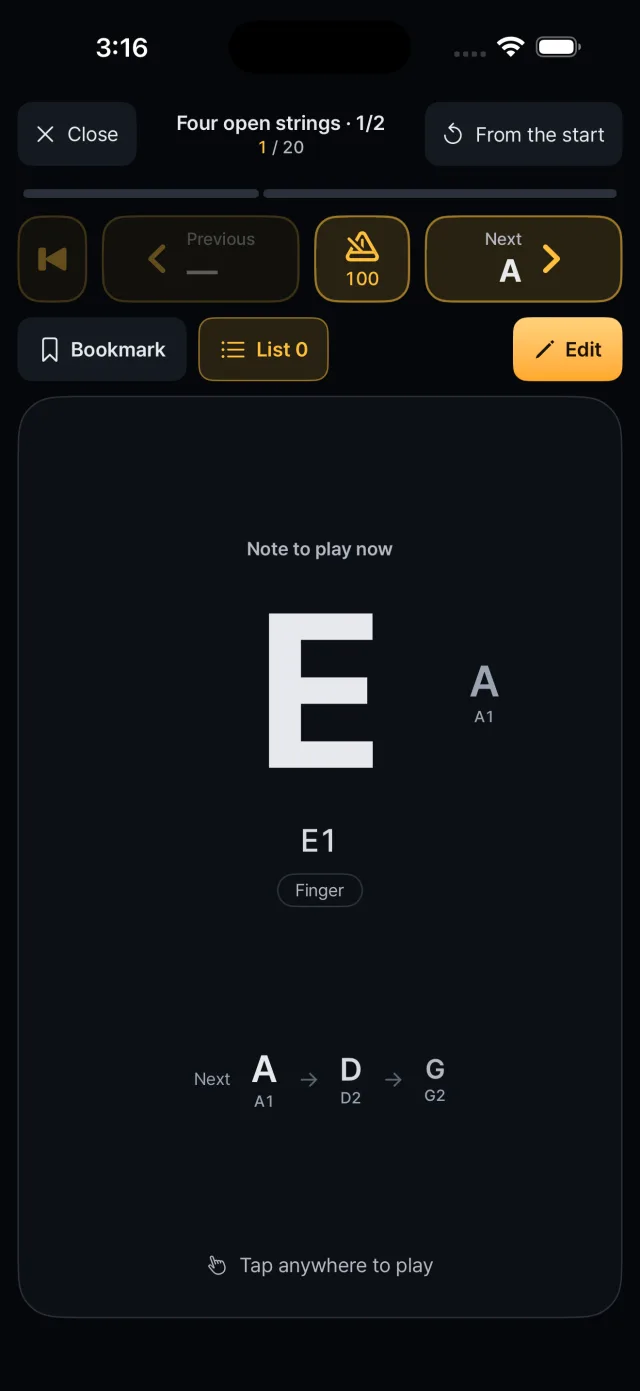
The notes you entered come up in order. Touch the screen to sound the current note; lift to move to the next.
The screen
The large letter in the middle is the note to play, with its pitch (for example E1) and technique.
The next three notes appear below, and the notes before and after can be shown small at the sides (switch off in settings).
The top shows the section name, the repeat count and the position in the whole song.
Press, hold, release
1Touch anywhere on the screen and the note sounds at that moment.
2While you hold, the sound decays naturally.
3When you lift your finger it is briefly muted and the next note comes up.
If you alternate two fingers, a new touch cuts off the previous note and plays the next one immediately.
Moving between notes
Buttons step to the previous or next note without sound, and one returns to the very beginning.
Stepping plays a short preview of the note.
After the last note you can play again or go to note editing.
Techniques
The technique set on each note is applied while playing.
Slide Hold and drag about 44 pt to slide to the target note. The pitch moves while you drag.
Hammer-on Tap or drag with another finger and the note carries on without a new attack.
Gliss out Lift your finger and the note slides down and fades.
Ghost A dull, pitchless hit.
Sections and repeat count
Notes are grouped into sections, each with a repeat count.
During play the top shows “section name · n/m”.
You can start from the whole song, from this section, repeating only this section, from a selected note, from a bookmark, or from where you left off.
Bookmarks and resume
Save the current position as a bookmark: up to 30 per song, including the repeat count.
Tap a marker on the progress bar to jump to it.
Your last position is saved when you leave and cleared when you reach the end.
Restart and metronome
The “From the start” button at the top right restarts the song.
Tap the metronome to turn it on or off and press and hold to set the BPM: 30 to 240, 100 by default. It is a single click with no beat accent and stops when the app becomes inactive.
Strength and settings
Strength is set per song: tap strength (default), fixed (soft, medium or strong per note), tap position, or pressure.
In settings you can change tap sensitivity (0.5 to 2.0×), vibration, master volume (20 to 100%) and whether the screen stays on while playing (on by default).