Easy Guitar
Build chords
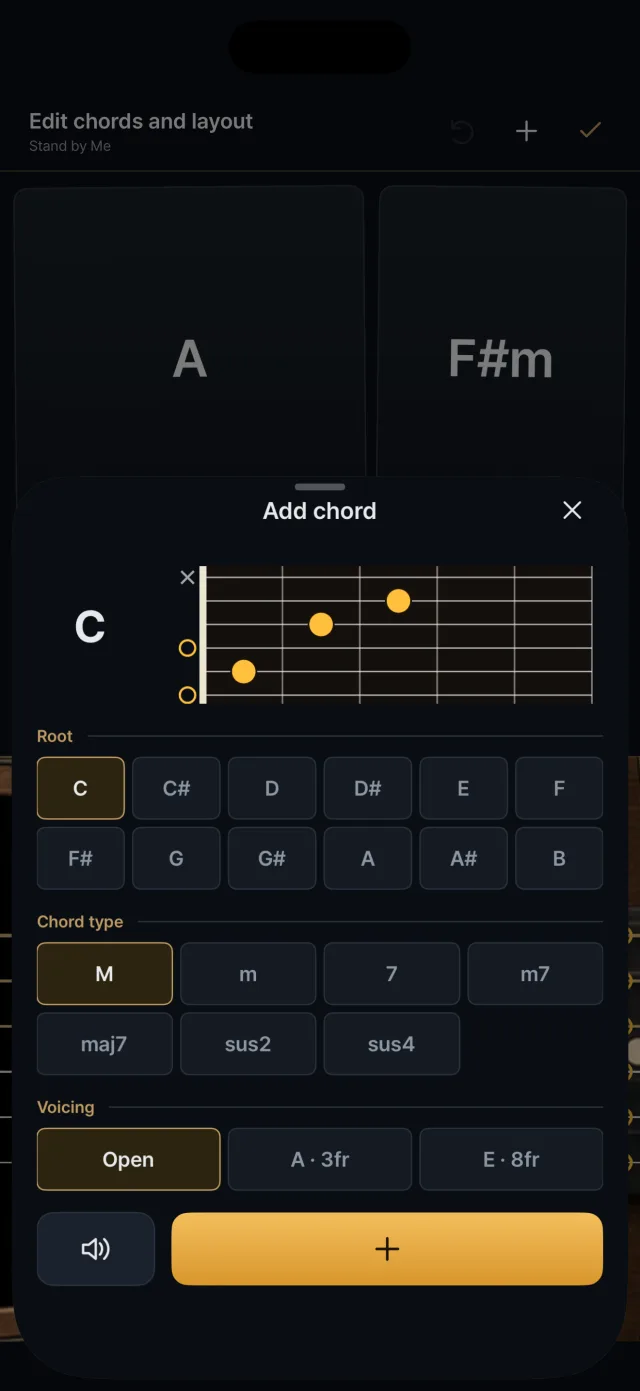
Choose a root, a type and a form to make a chord, check the fretboard diagram and sound, then add it as a pad.

Choosing a chord
- Root C, C#, D, D#, E, F, F#, G, G#, A, A#, B (12)
- Type M (major), m, 7, m7, maj7, sus2, sus4 (7)
- Form Open, E-shape barre, A-shape barre. One to three appear depending on the combination, and barre forms show the fret number (for example A · 3fr).

Fretboard diagram and preview
- The chord's name and a fretboard diagram appear together.
- Amber dots are the fingered positions, ○ is an open string and × a string you do not play.
- The sound plays automatically each time you pick a form, and you can hear it again with the speaker button or by tapping the diagram.

Adding, changing and deleting pads
- In edit mode (the slider-shaped edit icon at the top), press + to add a chord.
- Press a pad to change its chord.
- Deleting asks for confirmation. At least one pad must remain.
- A song can have up to 12 pads.
- Undo goes back up to 30 steps.

Making a song by hand
- Press + in the library, give the song a name and an optional artist, and add up to 12 chord cards.
- Drag to reorder; the same chord cannot be added twice in one song.